Techmell |
- Cover Feed to be Launched for Facebook Android App
- BlackBerry testing BBM Beta for Android and iOS Devices
- Car Adjustment Feature in iPhone 6 Running iOS 7
- Customize Backlight Screen Timeout on HTC One [How To]
| Cover Feed to be Launched for Facebook Android App Posted: 03 Aug 2013 04:57 PM PDT Facebook Android app received another update this Thursday unveiling a very interesting feature added to the update for Facebook Home. Say hello to Cover Feed. Android users do not need to go over the hassle of downloading Android launcher since it is now possible to benefit from the lock screen for Facebook Home.
This update is not very different from the Home version as far as the feel of the app is concerned however, it lacks Chat head and Home launcher features unlike the Home counterpart. But the Chat heads can always be activated from the Messenger app on Facebook. A cover Feed option has been integrated into Facebook Home and its users could avail the option as soon as it was launched. The same option has been offered this Thursday to users only having a Facebook Android app in their devices. Cover Feed is not the first of its kind to have paved its way from a standalone Facebook app to the main app. Social network sites usually test their new features on their standalone apps first such as Home, Messenger or Poke before they make the decision of integrating a feature as part of the main Facebook App. Along the same lines, the company has called out to Android users willing to join the beta program for testing beta versions of the Android app before it is made available for all. If you are an Android user then wait for the update since it will be reaching the users in a few days from now. Download Facebook App for Android from Here The post Cover Feed to be Launched for Facebook Android App appeared first on Techmell.  |
| BlackBerry testing BBM Beta for Android and iOS Devices Posted: 03 Aug 2013 04:41 PM PDT BlackBerry users have exclusively enjoyed BBM service that allowed only BlackBerry owners to connect but things are about to change as it seems the company is expanding the service to include iPhone and Android devices in BlackBerry Messaging without the users having to get a BlackBerry device.
The beta version of BBM app will require the iPhone users to have at least iOS 6 whereas it runs on Android 4.0 and higher versions of the OS. The Next Web also mentioned there is a hint in beta testing of the app which could mean the release for both the platforms is ready and “just around the corner.”
Where it is interesting for iOS and Android users to be added to the BBM world, on the contrary things might not look as good for BlackBerry as people would have one less reason to buy a BlackBerry device for a service that they can also find on an Android or iOS device. Source: TNW The post BlackBerry testing BBM Beta for Android and iOS Devices appeared first on Techmell.  |
| Car Adjustment Feature in iPhone 6 Running iOS 7 Posted: 03 Aug 2013 04:27 PM PDT Apple has moved one step ahead by coming up with features in their devices that make them all-in-one-devices especially the iPhone. It is rumored iPhone 6 will come with the car adjustment feature added in upcoming iOS 7. According to the patent filed by the company on United States Patent and Trademark Office, you can use your iPhone to set a radio station, adjust the mirrors of your car and even level the car seats by tapping on the iDevice screen.
iOS for car configuration was unveiled in May at the iOS 7 launch that allowed users to link their iPhone to the entertainment system in their car. The technology if included in iOS 7 will make a lot of things easier for car owners and users alike however, no such code has been located in any beta up till last week's release, iOS 7 Beta 4. The expected release of an iPhone 6 may launch in 2014 housing a bigger 4-inches screen, A7 processor as well as a 12MP camera. Prior to that, an iPhone 5S and iPhone Light are expected to come out sometime in September. The post Car Adjustment Feature in iPhone 6 Running iOS 7 appeared first on Techmell.  |
| Customize Backlight Screen Timeout on HTC One [How To] Posted: 03 Aug 2013 01:37 PM PDT HTC One brings amazing features for the users and it can be considered a great Smartphone indeed. You can play with its newly introduced features and functions and can adjust its settings as per your requirements. Today we will discuss how you can change the Screen Time out on HTC One.
Here is how you can adjust the screen time out settings in your newly bought HTC One. Just follow the directions below to complete the process successfully. Step 1: One the display screen, you will see the icon of "Applications" at the bottom that should be pushed. Step 2: Now you will be in the Applications section where you need to look for "Settings" app that can be found in the second or third row. Step 3: When you scroll down the list that appears on your screen in the settings menu, you will see the option "Display & Gestures" that can be found next to Accessibility. Select this option to move further. Step 4: Now you will in the next menu where you will see some display options. You will find the "Sleep" option next to the Brightness. Click on the "Sleep" option to set your desired Screen Time Out duration. Step 5: Once you have done with it, you will see the Sleep menu where you will get various options for Screen Time Out from 15 seconds up to the maximum time. You can select "Never Turn Off" if you do not bother about your battery life and if you want to save the consumption of your battery, you can select 15 seconds that is the shortest screen time out. Now the settings have been saved and you will see that your screen time out has been set according to your desired setting. The post Customize Backlight Screen Timeout on HTC One [How To] appeared first on Techmell.  |
 The Cover Feed feature allows posts and photos of friends from your
  Information from BlackBerryOS.com revealed, the company has called out for BBM app's beta testing to Google's Android and Apple's
  With all the main features in control via your iPhone, you hardly need to worry about doing all the adjustments every time you get into your car especially if you share a car with family or friends or use a hired car. Just consult your iPhone and you are good to go.
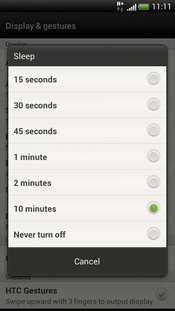 Generally, if you change the screen time out of your amazing Smartphone, you would be able to use a long lasting battery timings. You can enhance the battery time by using this feature. So you need to change the Screen Time out according to your needs. If you require a long lasting battery, you should turn off the screen time out or set it to only 15 seconds or 10 seconds after you leave your HTC One in idle state.
| You are subscribed to email updates from Techmell To stop receiving these emails, you may unsubscribe now. | Email delivery powered by Google |
| Google Inc., 20 West Kinzie, Chicago IL USA 60610 | |
No comments:
Post a Comment