Techmell |
- Android 4.4 KitKat: Android’s New OS would be Full of Crunch
- Windows 8.1 All RTM Versions Leaked
- Bill Looking for a New CEO for Development of Windows 10
- iPhone 5S Home Button Supports for Fingerprint Recognition [Image Leaked]
- How to Disable Driver Signature Verification on 64-bit Windows 8.1
- How to Receive Stock Updates on HTC One Automatically
- Android 5.0 Key Lime Pie Unveiling Date Arrives
- iOS 7 Final Download Links will be Available on 10th September at 08:00 AM in New York
| Android 4.4 KitKat: Android’s New OS would be Full of Crunch Posted: 03 Sep 2013 04:10 PM PDT The upcoming Android version has been assigned the name KitKat. It is very pleasant and somehow unbelievable, but it is true that Google made an official announcement that the Android OS by Google will be given the name KitKat and Google has got the license for using this name from Nestle. Sundar Pichati, the Android chief on Google exposed that the company has done 1 billion activations, then it suggested the KitKat name for its future Android 4.4 OS. Google is using a branded name for the very first time for its Android operating systems. The users know that it has gone ahead in the past without using branded names and used generics such as Jelly Bean or Eclair.
It seems that Google planned to release a "K" series of Android. Earlier it was "Key Lime Pie" and now it will be "KitKat". Basically, Google wants to change the "K" from Key Lime Pie to KitKat because Key Lime Pie is only popular with the Florida state where it is an official pie, whereas KitKat is popular around the globe. So, Google realized the truth that the taste of Key Lime Pie is known by a few people while the KitKat is a worldwide brand. The users will find chances to win Androids if they buy KitKat branded by Android. They will also have chances to win Google Play credit and Nexus 7. Via: CNET The post Android 4.4 KitKat: Android’s New OS would be Full of Crunch appeared first on Techmell.  |
| Windows 8.1 All RTM Versions Leaked Posted: 03 Sep 2013 03:47 PM PDT Microsoft has prepared the RTM version of Windows 8.1 on August 21st, but it did not announce this news and officially Microsoft declared this success on 27th August in the evening. According to Carter, who has leaked a lot of authentic leaks has now issued a news that Windows 8.1 all of the RTM versions are leaked. Initially, Windows 8.1 Simplified Chinese and Professional edition in English have been already leaked and now all of the current RTM versions of Windows 8.1 have been leaked. Microsoft does not seem to make efforts for blocking all these unofficial leaks because whenever you download or activate Windows 8.1, you need to provide the product key to the system for proceeding further. So, the leaks can only give the popularity to Microsoft products. Now the official versions of Windows 8.1 RTM including Enterprise Edition, Professional Edition, 64-bit, 32-bit Core Edition have been leaked and these versions can be downloaded in some local languages such as German, Japanese, Russian version, Simplified Chinese and English version. It is indeed a great news for the users of Windows and they will be amazed to know all this.
The post Windows 8.1 All RTM Versions Leaked appeared first on Techmell.  |
| Bill Looking for a New CEO for Development of Windows 10 Posted: 03 Sep 2013 01:15 PM PDT According to the recent news, Microsoft is looking for the next CEO. Although there are a lot of talented and efficient people who have showed a desire to serve as Bill Gates interim CEO of Microsoft. A renowned Russian media person Wzor who has brought a lot of authentic news to us regarding Microsoft has recently revealed that Microsoft is planning for Windows 10 that will be the foremost cloud operating system of the company and even more than that. He also stated that Steve Ballmer, the current CEO of Microsoft is getting retired and Microsoft requires a new CEO that can be hired easily as there are a lot of efficient people, but Gates will return to Microsoft during the building process of Windows 10.
Although this Russian news reporter has leaked Windows 8.1 a few days back and the users know that Windows 8.1 is still not released. It is quite true about him that he released Windows 8.1 tested version for the users, but when Gates came to know, he just considered it philanthropy and that is the reason, he is not against such leaks. Source: Mydrivers The post Bill Looking for a New CEO for Development of Windows 10 appeared first on Techmell.  |
| iPhone 5S Home Button Supports for Fingerprint Recognition [Image Leaked] Posted: 03 Sep 2013 12:50 PM PDT C Technology Micro-blogging has brought a wonderful news to enhance the excitement of the users that the Home button of iPhone 5S will contain the fingerprint recognition. As the users know it very well that Apple got AuthenTec technology that is a kind of fingerprint sensor company previously year in July and we came to know later that Apple is going to launch an advanced machine for the upcoming iPhone 5S with the identification of fingerprints. So, the users would be able to enjoy this amazing technology on the latest iPhone 5S.
The WeiPhone News keeps on explaining more that the source is reliable so, the news is quite true and iPhone 5S is going to give its appearance before the public in 10th September. So, the users need to wait for a while to know what more it is brought to them. The post iPhone 5S Home Button Supports for Fingerprint Recognition [Image Leaked] appeared first on Techmell.  |
| How to Disable Driver Signature Verification on 64-bit Windows 8.1 Posted: 03 Sep 2013 11:56 AM PDT If you want to install an unsigned driver, you can’t do so until you disable the signed driver on 64-bit Windows 8.1. Here is a step-by-step guide for the users of Windows 8.1 who are unable to disable the Driver Signature Verification on their latest 64-bit Windows 8.1. Guide to Disable Driver Signature Verification on 64-bit Windows 8.1Step 1: To begin, you need to press Windows + C keys on your keyboard simultaneously to make the Charms bar appear on your screen. Here you will see the option "Settings" at the bottom of the Charms Bar. Click on it.
The post How to Disable Driver Signature Verification on 64-bit Windows 8.1 appeared first on Techmell.  |
| How to Receive Stock Updates on HTC One Automatically Posted: 03 Sep 2013 11:38 AM PDT HTC One brings so many advanced features for the users. One of them is a stock app. This application provides the latest updates regarding stock exchange market. It gives you the latest quotes and news about the stock exchange. You can receive the updates constantly or frequently according to your requirements. If you want to receive updates about stock quotes and news constantly, it will consume your battery a lot and you need to charge your battery soon. So, it is recommended to set the updates on seldom or frequently to avoid such battery problems. You can receive stock updates once you set this feature in your HTC One. It is undoubtedly a great feature not only for the people who want to keep in touch with the current situation of the stock market, but also for the people who want to know the current exchange rate of goods in the local and international stock exchange market. So, let’s know how to set this feature for receiving updates. You need to follow the steps given below for setting this feature.
|
| Android 5.0 Key Lime Pie Unveiling Date Arrives Posted: 03 Sep 2013 11:12 AM PDT Now that Android 4.3 Jelly Bean is existing in the market, a wide range of the users had diverted their attention towards the upcoming Android OS. Now they are again waiting for the launch of Android 5.0 Key Lime Pie. In spite of the "bait and switch" situation, Android 5.0 Key Lime Pie was never fade away from the sight. This OS was existing at Google I/O as Easter Eggs in conference. Now the launch date is coming near for Android 5.0 Key Lime Pie. Daum, the Korean publication suggested to release it in early days of July, but Taylor Wimberly from Android & Me suggested to release it in the beginning of August.
The news alerts regarding the features of Android 5.0 Key Lime Pie are scarce because the spotlight OS is still Android 4.3 for the users throughout the world. Wall Street Journal says that there will be a majority of the devices that could be run on Android 5.0 Key Lime Pie and another rumour is that it will be suitable for Nexus Q smart watch. So, the fact is that except of the proposed devices by Wall Street Journal, there will be a few other devices that will be considered a perfect match for this OS. The Motorola and LG devices are also one of them. The post Android 5.0 Key Lime Pie Unveiling Date Arrives appeared first on Techmell.  |
| iOS 7 Final Download Links will be Available on 10th September at 08:00 AM in New York Posted: 02 Sep 2013 02:42 PM PDT According to the trustworthy sources, Apple has announced an official time for downloading iOS 7 for the users throughout the world. Officially iOS 7 will be available for the users at 08:00 New York time on 10th September and they can download on your systems. The users would be well versed that the time when they can download iOS varies from country to country. Suppose you live in Taiwan, Hong Kong, Beijing or Shanghai, you would be able to download it at 12:00 because it will be opened for these countries on exact 12:00 AM. According to a Chinese news site weiPhone, 10th September will be the busiest day for Samsung, Apple and other big names in the Mobile Phones industry. Apple is going to launch its low-cost iPhone 5C and Champagne gold iPhone 5S on the same day. Similarly, it is also going to release the advanced iOS 7 on 10th September. As the previous news reports stated that iOS 7 will be released on 16th September for a formal downloading throughout the world, but now the reports says that it is launched on the very same day and the users who are anxiously waiting for iOS 7 would be able to download iOS 7 and enjoy using it. Apple has made a lot of noticeable changes in iOS 7 to make it perfectly according to the requirements of users. It has changed its design and a wide range of new features have been added to it. Now according to the tech community, the upcoming iOS 7 is indeed the best iOS versions. iOS 7 Download Time Schedule for All CountriesThe post iOS 7 Final Download Links will be Available on 10th September at 08:00 AM in New York appeared first on Techmell.  |
 In a
In a  You just need to use the product key for activating the Windows 8.1 RTM, once you download and install it. A user feedback shows that the leaks have normal operation once you install the
  Source:
  It is also reported by Wzor that the Project Microsoft Windows 10 Cloud is usually known as "Windows 10 code" and it is very similar to the Chrome operating system. The users would be able to run all of its programs or features online. If you want to use it in offline mode, it can be used up to 180 days and after the period of 180 days, you need to authorize network surely otherwise, it will not work.
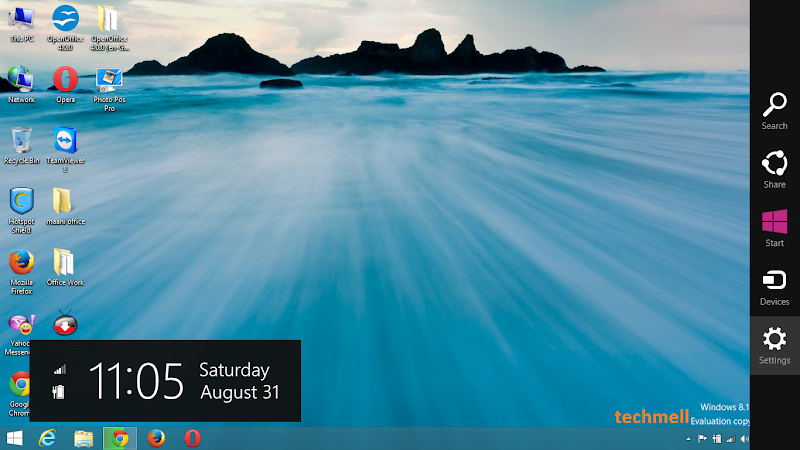 Step 2: Now you will see the option "Change PC Settings" in the next menu appears before you. You need to select it in order to go ahead.
 Step 3: In the
  Step 4: In the menu of update and recovery, you should select "Recovery" option that appears at the bottom of some options as it has been shown below in the image.
 Step 5: Now you need to click the option "Restart Now" on the "Advanced startup" screen that appears before you.
 Step 6: Your system will restart now and once it finishes the process of rebooting, some options will appear before you where you have to select "Troubleshoot" to proceed further.
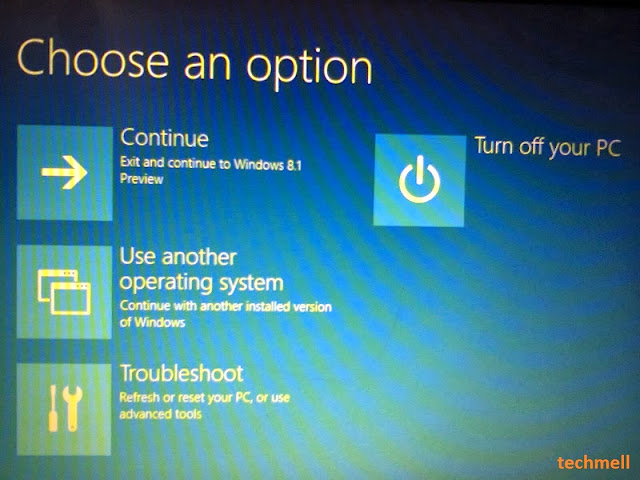 Step 7: Now you will be taken to the next menu where you have to select the "Advanced Options" that appears at the bottom of the list before you.
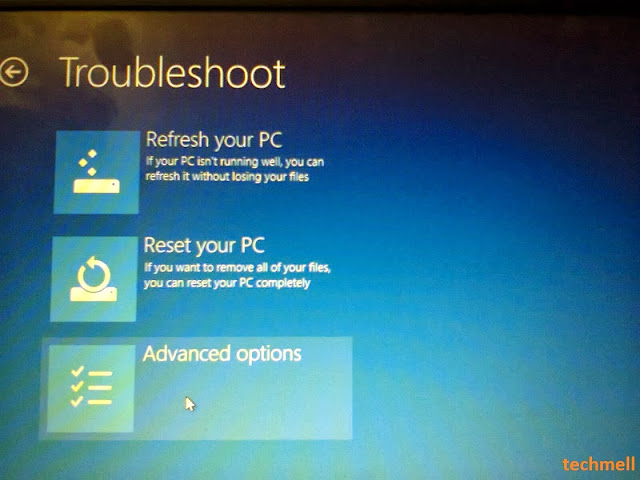 Step 8: In the section of advanced options there will be an option "Startup Settings" on the right side of your screen. You have to select this option. The image below shows you the same option.
 Step 9: Since we are changing the settings for the boot time configuration, so, once again you need to
  Step 10: Finally, you would be able to see the list of the modifications you have made. Since you are trying to "Disable Driver Signature Enforcement", you have to press "F7" key.
 That’s all. Now once again your system will reboot and you would be able to install any unsigned driver. No error message appears now.
 Steps to Receive Frequent Stock Updates on HTC One
 Now through some reliable sources we came to know that Android 5.0 Key Lime Pie is going to be released in October and if it does not launch in October, it will be then come to the light by the year 2013 ends. The users are usually in habit of getting an Android Operating System in Fall and in the summer and with the current release of Android 4.3, it seems that Google will be consistent in adhering to its tradition.
| You are subscribed to email updates from Techmell To stop receiving these emails, you may unsubscribe now. | Email delivery powered by Google |
| Google Inc., 20 West Kinzie, Chicago IL USA 60610 | |
No comments:
Post a Comment