Techmell |
- Developers are More Happy with Android 4.3 Jelly Bean [Complete Features]
- Canonical Providing Opportunities to Developers with Ubuntu API
- YouTube Upload: Nokia Releases New App to Upload Videos
- How to Use Windows 7 Explorer, Task Manager and Start Menu in Windows 8.1
- Only 2 Services Online on Apple’s Website: No Green Signal for iOS 7 Beta 4 Release!
| Developers are More Happy with Android 4.3 Jelly Bean [Complete Features] Posted: 25 Jul 2013 01:50 PM PDT Android 4.3 is released bringing no major shift from the earlier version of OS. However, a number of small improvements and much needed features have made the Android experience perfect, more reliable. Being Google's branded phones, the Nexus tablet and Smartphone family get to welcome the Android 4.3 update before all. Devices including Nexus 4 and Google Nexus Smartphones and Nexus 7 and Nexus 10 tablets will be receiving the update soon. Simultaneously, developers have already been given access to Jelly Bean 4.3 so they prepare their data for newer OS.
|
| Canonical Providing Opportunities to Developers with Ubuntu API Posted: 25 Jul 2013 01:17 PM PDT Canonical, the developer responsible for Ubuntu stated last Wednesday were regarding the launch of a series of Application Programming Interfaces (APIs). Something developers will get a boost from to create multiple apps for Ubuntu. The Canonical has been a result of Mark Shuttleworth, a known billionaire from South Africa.
Canonical intends to create an Ubuntu Smartphone with the aid of this program to achieve its goal by the beginning of year 2014. It seems like the company is all geared up to challenge Android and iOS authority in the markets. Beta release is claimed to have features devised to ensure easier development for Ubuntu applications.
HardwareWe might witness the new Smartphone sometime in May 2014 as per the company's wishes but the firm's identity responsible for making the hardware is still not revealed. Best bets are on HTC, LG and Asus. HTC is known for welcoming new platforms since it was the foremost to support Android while it is accredited for launching a Windows Phone device.
On the hand, LG has the reputation built upon Google's Nexus 4 and the company is readying itself for higher Smartphones. According to Canonical's bold claim, it is supposedly much smoother to make applications on Ubuntu with the combined support of the API development set and open-source community as compared to other platforms. You may download the Ubuntu SDK for free with complete guidelines. Via: News24 The post Canonical Providing Opportunities to Developers with Ubuntu API appeared first on Techmell.  |
| YouTube Upload: Nokia Releases New App to Upload Videos Posted: 25 Jul 2013 12:58 PM PDT YouTube lovers and users needing constantly to get to YouTube for uploading their videos have good news coming from Nokia, exclusively for Lumia users only. Nokia revealed it has devised a brand new application to aid users for uploading YouTube videos. Though this app, owners of new Lumia 1020 can post videos directly to YouTube from within the app. Where these Lumia users have been made happy, the ones having other Lumia handsets might not be too happy about the limitation.  Credit: Cnet This app under the name of 'YouTube Upload' has been made available at Microsoft’s Windows Phone store allowing users to choose the Video and upload it straight away from Photos app. The videos can also be treated to a trim in Nokia Video Trimmer app prior to upload. As far as the supported format of the videos is concerned, the app works for “all videos shot on Nokia Lumia phones with Windows Phone 8.” When app tests were carried out on varying Lumia models at The Verge, it was concluded that the app worked successfully on the latest Lumia 1020 only. All other Lumia Smartphones including Lumia 800, Lumia 900 and others could not run the app. Speculating from the app support for WVGA displays and the description associated with it, Nokia might intend to include all Lumia Smartphones with Windows Phone 8 to run the app. Till then, we can look forward to it. The post YouTube Upload: Nokia Releases New App to Upload Videos appeared first on Techmell.  |
| How to Use Windows 7 Explorer, Task Manager and Start Menu in Windows 8.1 Posted: 25 Jul 2013 11:19 AM PDT When the users came to know about the release of Windows 8.1, they were too excited to practice this update from Microsoft. Since Microsoft has added a wide range of the latest features in Windows 8.1 and a lot of the existing features have been updated for the convenience of the users. So, the users who switched from Windows 7 to Windows 8.1 directly are facing difficulties in using Windows 8.1 and they are looking for some easy ways to use the Start Menu, Task Manager, IE Explorer on Windows 7 in Windows 8.1 for their comfort. So, the users who are not so much excited while using the advanced Start Menu, Metro UI, Task Manager and Explorer on Windows 8.1 can still get back to these features in the style of Windows 7. Today we will discuss about getting the above mentioned features of Windows 7 back into Windows 8.1 and here is a step-by-step guide for doing so with the help of a third party tool. Steps to Use Windows 7 Explorer, Task Manager and Start Menu in Windows 8.1Windows 8 Start Menu Toggle is an amazing tool that is also compatible with Windows 8.1 and it can enable you to access your desired Windows 7 features in the same old style. You just need to click a button to switch between Windows 7 and Windows 8.1 Style. Step 1: You need to download this amazing tool that is available free for the users. Click here for downloading it. Step 2: Once it has been downloaded, you need to click on it in order to install it to your system.
The post How to Use Windows 7 Explorer, Task Manager and Start Menu in Windows 8.1 appeared first on Techmell.  |
| Only 2 Services Online on Apple’s Website: No Green Signal for iOS 7 Beta 4 Release! Posted: 25 Jul 2013 10:50 AM PDT Apple didn’t see it coming and definitely not on the day when iOS 7 Beta 4 release was scheduled. Nonetheless, the genius of Turkey succeeded in taking Apple's developer site down resulting in the consequent delay in iOS 7 Beta 4 release. Much to the bereavement of iOS 7 beta release followers, the two-week gap tradition between subsequent Beta release from Apple has been broken.
So far, the System Status on Apple's site shows only two services online: iTunes Connect and Bug Reporting. At least, developers can still distribute their apps over iTunes as well as get the bugs duly catered to. Other services are yet to be turned back on after maximum security is ensured.
With so much going on with Apple's Developer database, it is not surprising to see iOS 7 Beta 4 release being postponed. Depending how the improvements come about, the launch can be further delayed. Let's hope that is not the case. The post Only 2 Services Online on Apple’s Website: No Green Signal for iOS 7 Beta 4 Release! appeared first on Techmell.  |
 Android 4.3 Jelly Bean Features

 Step 3: You will see the image shown in the screenshot when you click on it for installation. You need to click on the option "I Agree" for going ahead.
 Step 4: Now you will see it on your system. You can open it by double clicking or by right clicking and selecting “Open”.
 When you click on it, it will show you the
 You do not need to restart your system to apply changes. You can use it without restarting your system. So, guys! You have done the job of getting back the Start Menu, Task Manager and
  Since the hack last Thursday, Apple has been working day in and day out to take measures in order to prevent such happenings from occurring again as they have mentioned in a disclaimer that has taken place on the Apple developer's website page till they can fully recover from the attack. Being developers and Apple users, the concern surely arises in the service area. What became of them? Apple has been conscious enough to bring the service back on track however the process is rather slow and cautious.
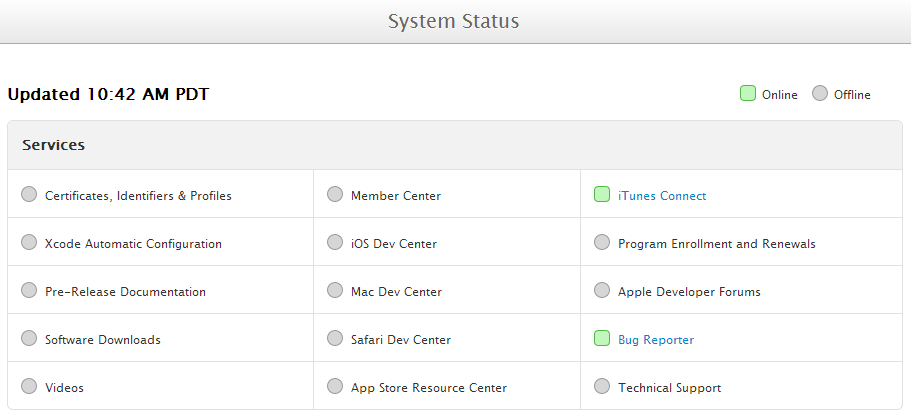 The iOS, Mac and Safari, all three developer centers are on a hold showing an offline service status. Other services including Certificates, Identifiers & Profiles to manage your team certificates and profiles during program membership time, Xcode offering tools for creating apps for Mac and iOS faster, Member Center that lets Developers enjoy resources from Apple for program development as well as Technical Support, Developer Forums and Program enrollment services are all offline as of now.
 | You are subscribed to email updates from Techmell To stop receiving these emails, you may unsubscribe now. | Email delivery powered by Google |
| Google Inc., 20 West Kinzie, Chicago IL USA 60610 | |
No comments:
Post a Comment